Set up the payment gateway
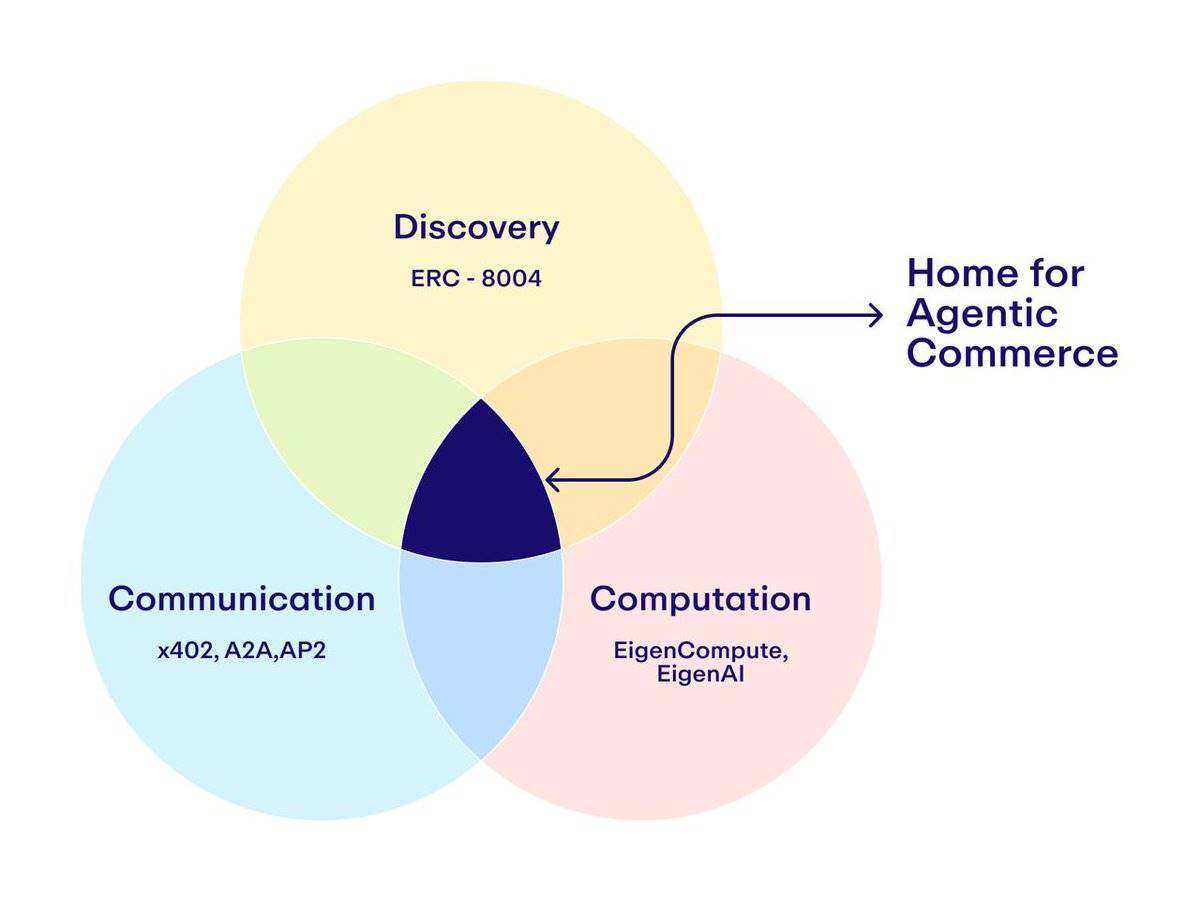
To enable your API to accept USDC payments from AI agents, you need to integrate the x402 facilitator. This component acts as the bridge between your backend and the blockchain, handling the validation of payments before your endpoint serves sensitive NFT metadata.
We will use Next.js for this integration, paired with Thirdweb's official x402 facilitator. This setup ensures that your API can reliably charge buyers and agents for access, following the standard workflow for payment-gated services.
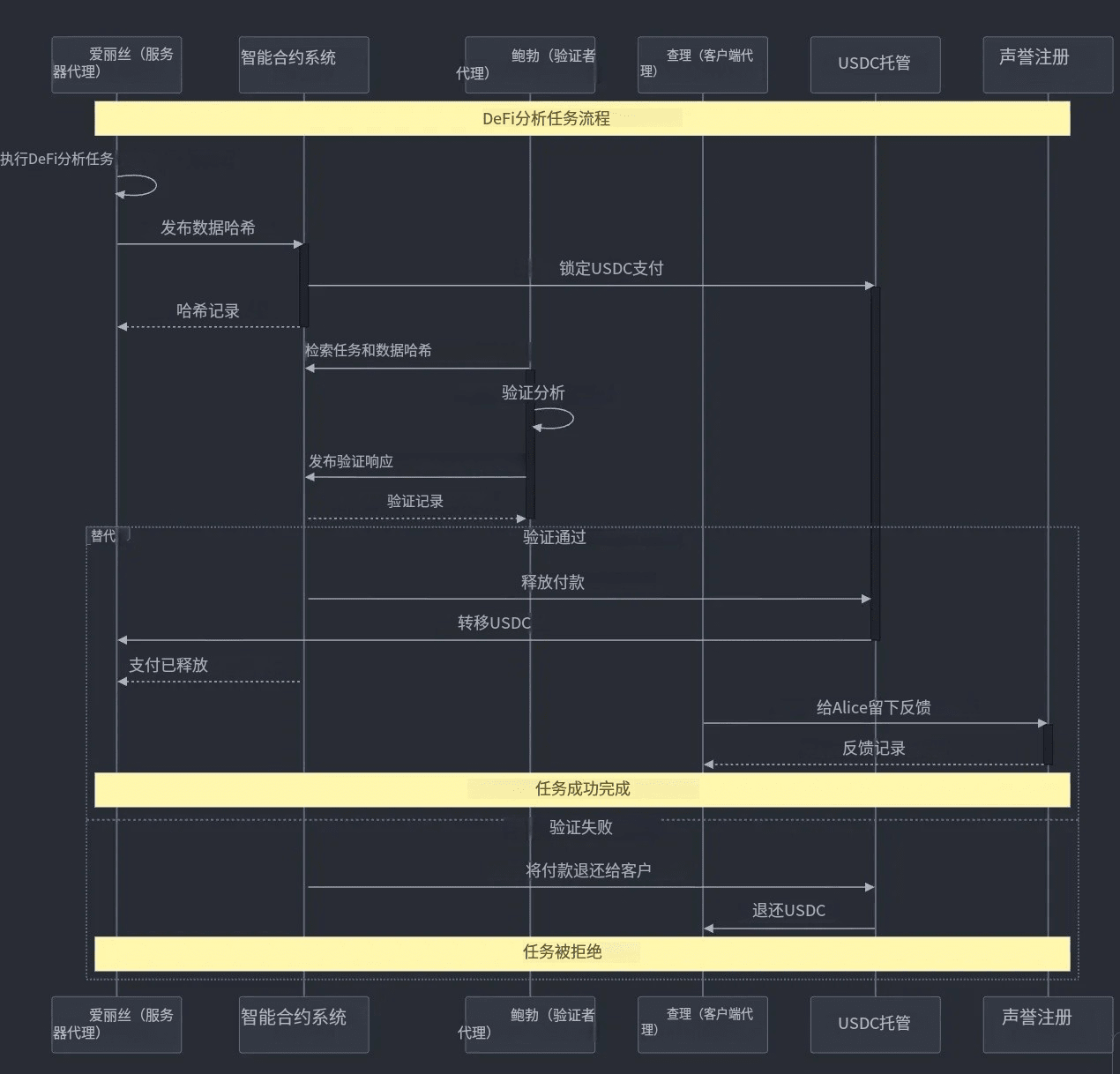
Start by installing the necessary dependencies in your Next.js project. You will need the Thirdweb facilitator package to handle the x402 protocol. Run the following command in your terminal to add the package to your project:
npm install @thirdweb-dev/facilitator
This package provides the core functions required to parse and validate USDC payments.
Next, set up your environment variables to connect your application to the blockchain. You will need your RPC URL, wallet private key, and the contract address for the USDC token you intend to use. Store these in a .env.local file to keep them secure.
NEXT_PUBLIC_RPC_URL=your_rpc_url
PRIVATE_KEY=your_wallet_private_key
USDC_CONTRACT_ADDRESS=your_usdc_contract_address
Ensure you are using the correct network (e.g., Base, Ethereum, or Polygon) for your USDC token.
Build a middleware function that intercepts requests to your metadata endpoint. This function will use the facilitator to verify that the incoming request includes a valid x402 payment proof. If the payment is missing or invalid, the middleware should reject the request immediately.
import { verifyX402Payment } from '@thirdweb-dev/facilitator';

export async function verifyPayment(req) {
  const isValid = await verifyX402Payment(req);
  if (!isValid) {
    return new Response('Payment required', { status: 402 });
  }
  return true;
}
This step ensures that only paid requests can access your NFT metadata.
Finally, apply the payment verification logic to your specific API route. Wrap your metadata retrieval logic with the verifyPayment function. This ensures that the NFT metadata is only served after a successful USDC transaction has been confirmed on-chain.
export async function GET(req) {
  const paymentValid = await verifyPayment(req);
  if (!paymentValid) return new Response('Payment required', { status: 402 });

  // Retrieve and return NFT metadata
  const metadata = await getNFTMetadata();
  return Response.json(metadata);
}
Your API is now ready to accept agent requests and process payments securely.
By following these steps, you establish a robust foundation for your x402 endpoints. The facilitator handles the complex blockchain interactions, allowing you to focus on delivering accurate NFT metadata to paying agents.
Connect to the metadata source
Your x402 endpoint needs a direct line to the truth. When an NFT’s traits or image change on-chain, your cached data becomes stale. To fix this, you connect your endpoint to official NFT data providers like OpenSea or Alchemy. These services act as the bridge between the blockchain and your application, ensuring the metadata you serve is current.
We will use the OpenSea API for this guide. It is one of the most reliable sources for NFT data. The process is straightforward: you send a request to their refresh endpoint, specifying the contract address and the token ID. The provider then queries the blockchain, updates their cache, and returns a success confirmation.
Here is how to structure the request. You need to target the /collections/{collection_slug}/nfts/{token_id}/refresh endpoint. This tells OpenSea to pull the latest metadata for that specific token. If you are using Alchemy, the endpoint path differs slightly, but the logic remains the same: you are asking a trusted oracle to update the record.
curl -X POST "https://api.opensea.io/api/v1/collection/{collection_slug}/nft/{token_id}/refresh"
Once the request is sent, the provider handles the heavy lifting. You do not need to parse the blockchain yourself. This saves time and reduces the risk of errors. Just make sure your API keys are secure, as these requests can incur costs depending on your provider’s tier. For high-stakes finance contexts, always verify the response code to confirm the refresh was queued successfully.
Wrap logic in the x402 handler
Your API route needs to act as a gatekeeper. Before you touch a single byte of NFT metadata, you must verify that the x402 payment token is valid. This ensures that only paying agents can trigger a refresh, protecting your infrastructure from spam and unauthorized updates.
The process follows a strict sequence. First, extract the token from the request headers. Second, validate the token against the x402 specification. Third, if the token is valid, execute the metadata refresh logic. If the token is missing or invalid, return an error immediately.
Start by parsing the x-x402-payment header. This header contains the signed payment token that proves the agent has allocated funds for this specific request. You need to verify the signature and ensure the token hasn't expired. Coinbase provides official documentation on how to handle these tokens for sellers, which serves as the primary reference for this validation step.
Once the token passes validation, proceed with the metadata update. Use the validated context to update the NFT’s on-chain or off-chain metadata according to your specific standard, such as HIP-412. By wrapping the refresh logic inside this payment check, you create a secure, self-sovereign endpoint that only responds to compensated requests.
Test the automated refresh flow
Before you hand this over to production, you need to verify that your x402 endpoint handles both the payment and the metadata update correctly. Think of this as the final inspection on a high-stakes trade; one missed parameter can leave an NFT with stale data or a failed transaction.
Follow this sequence to validate the end-to-end flow:
- Send the initial request: Trigger the refresh with a test NFT. Ensure the endpoint accepts the payload and returns a valid
200 OKor appropriate payment request. - Process the payment: Confirm that the x402 payment logic executes without error. The endpoint should recognize the payment and proceed to the next step.
- Verify metadata update: Check that the NFT’s metadata on the blockchain or indexer reflects the new data. Use a tool like the OpenSea metadata refresh or Alchemy’s refresh endpoint to confirm the cache is updated.
- Check for errors: Ensure no timeouts or 500 errors occur during the process. Log any anomalies for debugging.
If any step fails, trace the error back to the specific component—payment gateway, blockchain node, or metadata validator—before retesting.
Common metadata refresh: what to check next
When updating x402 endpoints, validation is the first line of defense. The Metadata Validator checks your NFT metadata against HIP-412 standards, ensuring your JSON schema is properly represented before it hits the blockchain. You can validate metadata by uploading a CSV file, a single JSON file, or a zip file containing multiple JSON files.
If a refresh fails, it is usually because the endpoint returned a non-200 status or the JSON structure was malformed. Queue a metadata refresh for a specific NFT to update its information from the blockchain, but always verify the response payload first. If the endpoint is unreachable, check your network connectivity and ensure the x402 token is valid before retrying.
No comments yet. Be the first to share your thoughts!