Why metadata refresh needs payment gates
NFT metadata refresh is a compute-heavy, bandwidth-intensive operation. Every time an AI agent or automated system requests updated token data, it triggers database reads, JSON serialization, and network transmission. Without a payment gate, this utility becomes an open resource. Scrapers and malicious actors can exhaust server resources, driving up infrastructure costs while providing zero revenue to the operator.
The economic problem is simple: high-cost compute should not be free. When metadata endpoints are public and unrestricted, they become susceptible to abuse. Legitimate users suffer from latency and downtime caused by automated bots. Building a paid API solves this by filtering out low-intent requests and monetizing the actual utility provided to AI agents.
By integrating x402, you turn a cost center into a revenue stream. The protocol handles the payment verification directly within the HTTP request-response cycle, ensuring that only clients who have paid for the refresh get the data. This protects your infrastructure while creating a sustainable model for maintaining up-to-date NFT metadata.
Integrate the x402 Facilitator
To turn your API into a paid endpoint, you need a bridge between your code and the blockchain. This is the role of the x402 facilitator. In a Next.js or Node.js environment, you typically use a library like Thirdweb or Coinbase CDP to handle the heavy lifting of signing transactions and verifying receipts.
The setup is straightforward. You start by installing the facilitator package and configuring your environment variables with your API keys and wallet credentials. This creates a secure context where your backend can generate payment requirements and validate incoming USDC payments.
Begin by adding the facilitator library to your project. For example, if you are using Thirdweb, run npm install @thirdweb-dev/sdk. This package provides the utilities needed to interact with the x402 protocol on-chain.
Create a .env.local file to store your sensitive keys. You will need your wallet private key (or signer configuration) and the facilitator API endpoint. Never hardcode these values; they must remain secret to prevent unauthorized access to your payment gateway.
In your backend entry point, initialize the facilitator client using your environment variables. This client will be responsible for generating the x-pay header requirements and verifying the USDC transfer receipts that clients send with their requests.
Once the facilitator is initialized, your API is ready to enforce payment gates. When a client calls your endpoint, the facilitator intercepts the request, checks for a valid payment receipt, and either proceeds to serve the NFT metadata or returns a 402 Payment Required error.
Connect NFT metadata refresh endpoints
After verifying the x402 payment, the next step is triggering the actual metadata update. The integration logic depends entirely on your chosen provider, as each handles the refresh request differently. You need to send a specific API call to the provider’s endpoint to queue the update. This section walks through the exact endpoints for OpenSea, Alchemy, and thirdweb.
OpenSea provides a dedicated endpoint for refreshing NFT metadata. To trigger an update, send a POST request to /api/v1/nfts/{chain}/{contract_address}/{token_id}/refresh OpenSea Docs. This action queues the metadata for re-indexing from the blockchain. It is particularly useful when token attributes change on-chain but the marketplace display has not yet updated.
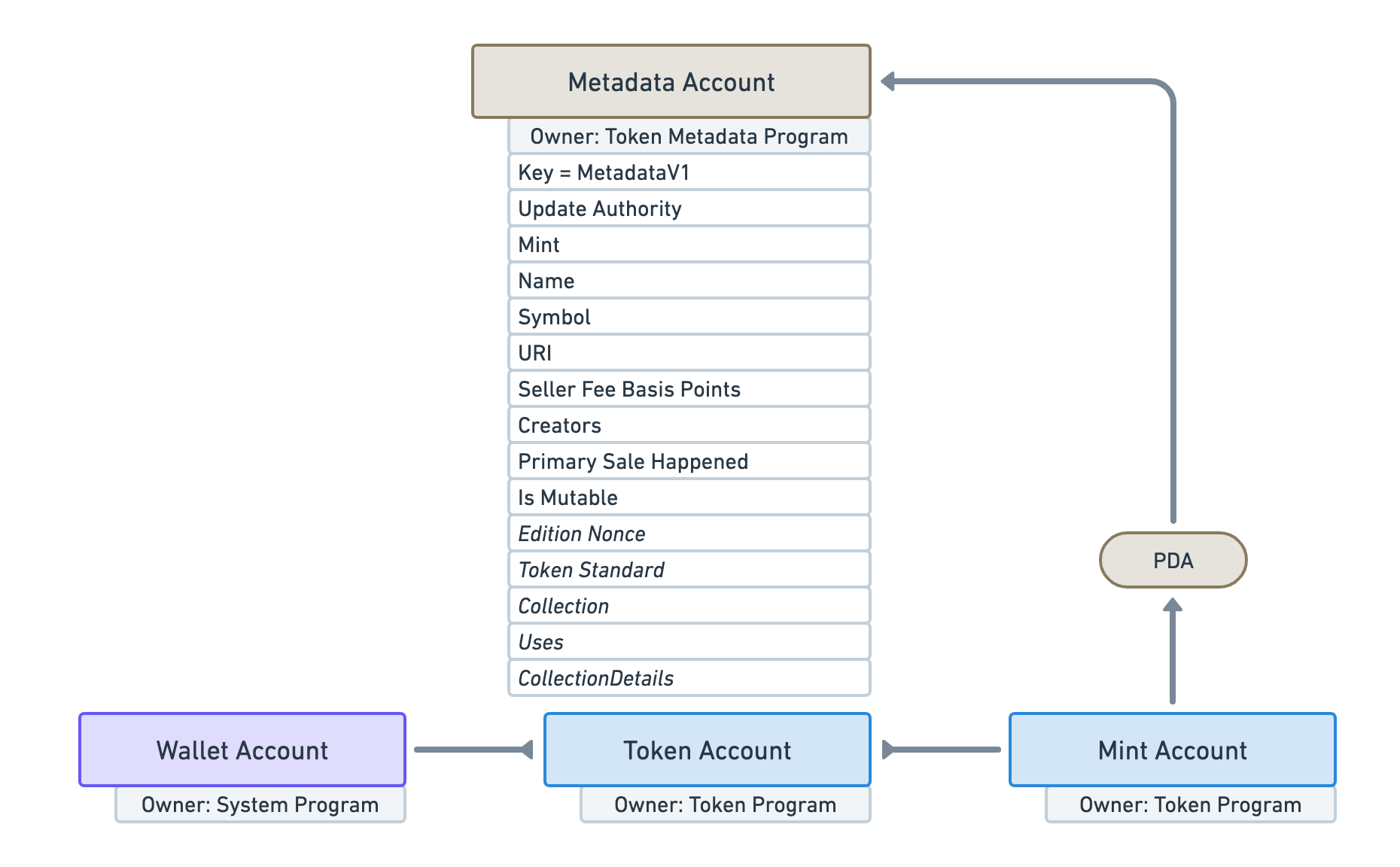
For Ethereum mainnet, Alchemy offers a high-throughput refresh endpoint. Use POST https://eth-mainnet.g.alchemy.com/nft/v3/{api-key}/refresh Alchemy Docs. This endpoint updates the cached metadata for a specific NFT token. Note that this service is currently limited to Ethereum; for other chains, you may need to use their general NFT API or a different provider.
If you are building on thirdweb, the approach is slightly different. You typically update the base URI of the contract itself, which forces all NFTs to pull new metadata. This is done via the contract’s setBaseURI function or through their SDK thirdweb Docs. This method is more efficient for batch updates across an entire collection than refreshing tokens individually.
| Provider | Supported Chains | Cost | Rate Limit |
|---|---|---|---|
| OpenSea | Ethereum, Polygon, Solana | Free (with API key) | 10 requests/second |
| Alchemy | Ethereum (Mainnet only for refresh) | Free tier available | 30 requests/second |
| thirdweb | Multi-chain (via SDK) | Gas fees only | N/A (Contract-based) |
When connecting these endpoints, ensure your x402 server handles the asynchronous nature of the refresh. Most providers queue the request rather than completing it instantly. Your API should return a success status immediately after queuing, allowing the client to proceed while the provider updates the index in the background.
Handle errors and retry logic
Building a paid API is straightforward until the network decides to be difficult. When you are charging crypto for every metadata refresh, a single network hiccup can cost a user their funds without delivering the data. You need to treat failure as a feature of the design, not an edge case.
Distinguish between payment and execution errors
The x402 protocol creates a clear separation between the payment step and the API execution. This is your first line of defense. If a 401 Unauthorized or 403 Forbidden error occurs, it usually means the payment token was invalid, expired, or missing. In this scenario, the server has not processed the request. You should instruct your client to reject the response immediately and prompt the user to re-authorize the payment. Do not retry the metadata fetch; the payment layer is broken.
However, if the payment succeeds but the backend returns a 500 Internal Server Error or a timeout during the metadata refresh, the situation is different. The user has already paid. Retrying blindly here is dangerous because you might charge them twice for the same data update. This brings us to the most critical concept in paid APIs: idempotency.
Ensure idempotency to prevent overcharging
Idempotency means that making multiple identical requests has the same effect as making a single request. For NFT metadata refreshes, this is non-negotiable. If your client retries a failed refresh, the server must recognize the request and return the result of the previous attempt without executing the blockchain call again. Without this, a simple network blip could result in a user paying for three metadata updates instead of one.
Implement a unique request ID in your headers. When the server receives a request with a known ID, it checks if the operation has already been completed. If it has, it returns the cached result. If it hasn't, it proceeds with the refresh. This protects your users from double-charges and protects your reputation as a reliable service provider.
Manage rate limits gracefully
Even with idempotency, you will hit rate limits. APIs like OpenSea or Alchemy have strict thresholds for how many metadata requests you can make per minute. When you encounter a 429 Too Many Requests error, do not retry immediately. Implement an exponential backoff strategy. Wait a short period, then retry. If the error persists, pause the queue entirely and notify the user that the service is temporarily busy.
This approach ensures that your x402 endpoint remains stable under load. It also prevents your application from being banned by upstream providers. By handling these errors explicitly, you turn a potential source of user frustration into a demonstration of robust engineering.
Verify payments and deliver data
Once the client submits the payment proof, your API must validate the transaction before releasing any sensitive metadata. This step acts as the gatekeeper, ensuring that only verified payments trigger the resource delivery. Rely on official Coinbase Developer documentation to handle the verification logic securely, as incorrect validation can lead to unauthorized access or data leaks.
Start by checking the transaction status on-chain. Confirm that the payment matches the expected amount, token, and recipient address. Use provider-backed widgets to monitor real-time network conditions, ensuring your verification checks aren't delayed by congestion. If the transaction is confirmed, proceed to update the NFT metadata in your database.
After updating the records, return the fresh JSON payload to the client. Structure your response to include the new metadata and a confirmation of the successful payment. This final handshake completes the x402 flow, allowing the requesting agent to access the updated information seamlessly.
Common x402 and metadata: what to check next
Here are the answers to the most frequent questions about x402 payments and NFT metadata refreshes.
How does the x402 protocol work?
x402 enables programmatic payments over HTTP using a simple request-response flow. When a client requests a paid resource, the server responds with payment requirements, the client submits payment, and the server delivers the resource [src-4]. This standardizes how AI agents and bots pay for API access without complex wallets.
How do you refresh NFT metadata?
To manually trigger an immediate metadata refresh, you typically submit a request to the provider's API. For instance, OpenSea and Alchemy offer specific endpoints to queue a refresh for a specific NFT, pulling the latest data directly from the blockchain [src-1][src-2]. This ensures your cached metadata reflects the most recent on-chain state.
How can I check if my NFT metadata is valid?
You should validate your metadata against the official schema for your target chain. For example, the Hedera Metadata Validator checks files against HIP-412 standards to ensure proper representation [src-serp-4]. Uploading your JSON or CSV files to such validators helps prevent display errors on marketplaces.
No comments yet. Be the first to share your thoughts!